Rocknet Lab
Two clusters, one router, and no open ports.
The Rocknet Lab is where I practice the work I do on carrier networks, at a much smaller scale. I'm rebuilding it in October 2026, going from one three-node cluster to two: a production side for services that have to stay up, and a lab side for building and breaking things.
Status: the new design is being built now. Until the move during the week of October 26, 2026, this site still runs on the original three-node cluster described under Earlier Lab Projects.
Production Cluster
Five Lenovo ThinkCentre Mini nodes (Intel i5, 32 GB RAM and a 1 TB SSD each) in one Proxmox VE cluster, installed on ZFS.
- Management node. Runs Proxmox Backup Server and Proxmox Datacenter Manager, and holds the backup drives.
- Two HA pairs. Each pair replicates its guests with ZFS every two minutes over a VLAN that's never routed. HA node-affinity rules keep each guest on its own pair, so if the active node fails, its partner restarts the guests.
- Quorum. Five nodes give five corosync votes, so the cluster keeps quorum through a node failure without a QDevice.
Lab Cluster
The three original Dell OptiPlex 9020s, wiped and rebuilt as their own Proxmox cluster. New builds, configs and tools start here. The lab has its own network: the firewall lets it reach the internet and send backups to the management node, and nothing else on the production side. It also runs the container I use to automate the builds, covered below.
Network
A Ubiquiti EdgeRouter 12 is the edge for both clusters.
- Dual WAN. Health checks run on both links. If the primary stops answering, traffic moves to the second link in about 30 seconds and moves back when the primary recovers.
- VLANs. Production is split into management, replication, production guests, a DMZ, staging and a test bench. The lab and an admin network each get their own segment.
- Switching in hardware. Production node-to-node traffic, including replication and corosync, is switched in the router's switch chip and never touches its CPU or firewall. Only traffic between networks is routed and filtered.
- Inbound. Nothing on the WAN side accepts new connections. Public traffic arrives through Cloudflare Tunnels that the cluster opens outbound, with a connector on each HA pair.
Backups and Alerts
Proxmox Backup Server takes nightly backups of production to an SSD, keeping 7 daily, 4 weekly and 3 monthly copies. Lab backups go to a second drive, along with a copy of the production backups, so losing one drive doesn't lose everything. An encrypted copy goes offsite, and problems send a push alert to my phone.
Hardware
- Production
- 5× Lenovo ThinkCentre Mini, Intel i5, 32 GB, 1 TB SSD
- Lab
- 3× Dell OptiPlex 9020
- Edge router
- Ubiquiti EdgeRouter 12, two SFP WAN links
- Switching
- 2× TP-Link TL-SG105 (lab and spare)
- Backup storage
- USB enclosure with 1 TB and 256 GB SSDs, plus a 931 GB drive
- Software
- Proxmox VE 9, Proxmox Backup Server, Proxmox Datacenter Manager
Building It with AI in the Loop
A container on the lab cluster runs Claude Code, and I use it as an agentic dev environment. I install Proxmox on each node by hand. A deploy script it helped me write does the rest in phases: cluster joins, HA rules, replication, backup storage, the management tools and the lab. Parts of it have been tested in throwaway containers, and the full run happens on build day.
I'm still the one doing the engineering. I have to know the Proxmox API, EdgeOS, Terraform and nginx well enough to say what to build, review what comes back and catch it when it's wrong. What changes is speed. Once I know what right looks like, I get there a lot faster.
Earlier Lab Projects
The Original Cluster
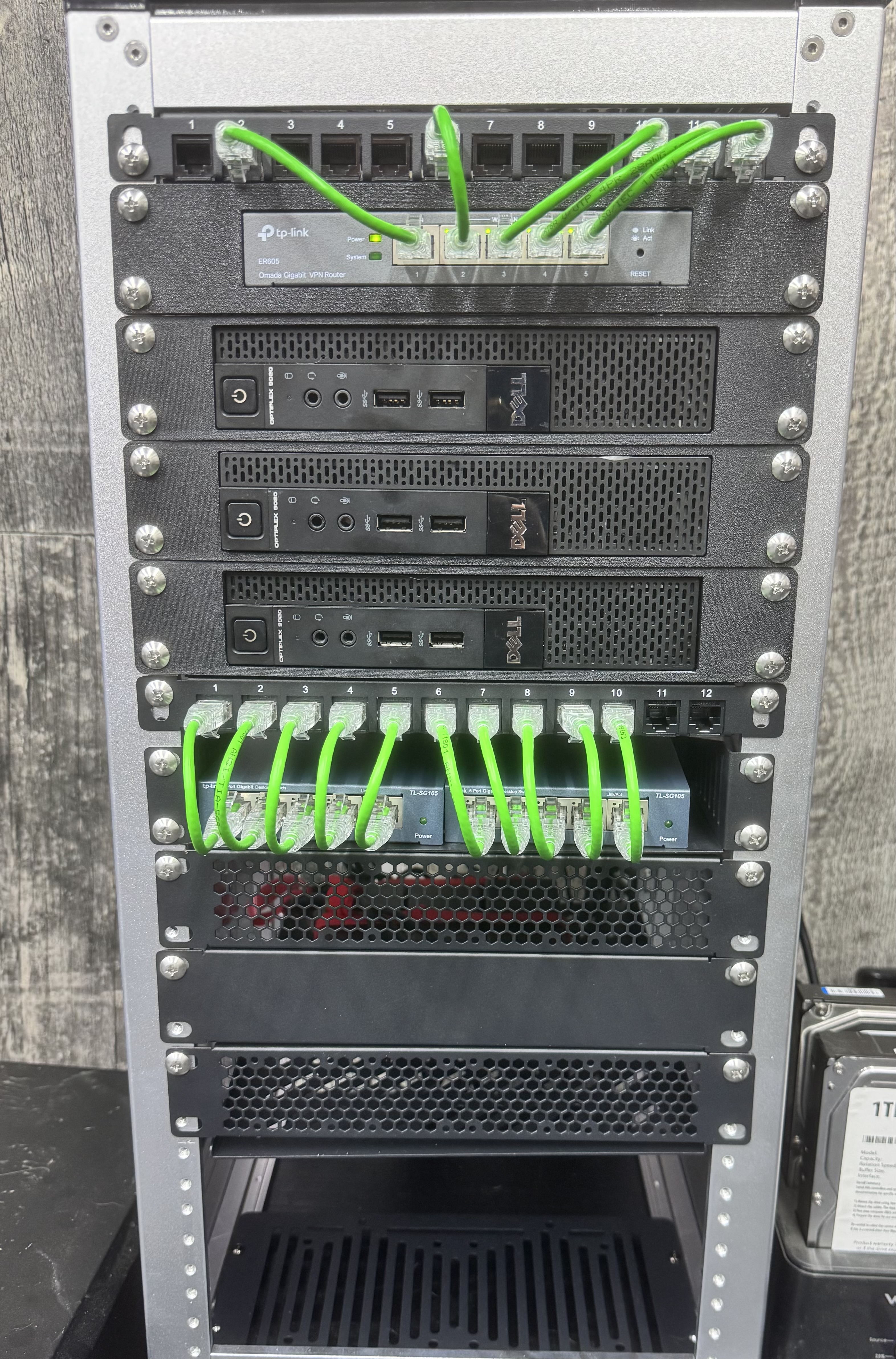
Three OptiPlex 9020s clustered as "Rocknet" behind a TP-Link ER605, with an NFS share on a USB drive for ISOs and backups. It hosts this site through a Cloudflare Tunnel, with no inbound ports open. I built a read-only telemetry panel for it that pulled per-node CPU, memory and quorum from Prometheus through the same tunnel. The panel has been retired, and this is a snapshot of what it showed.

VXLAN Overlay and Routing Lab
A cluster-wide VXLAN zone built with Proxmox SDN and Terraform, with a four-router, service-provider-style lab on top of it. The FRRouting routers ran IS-IS for the underlay, BFD for fast failure detection, iBGP with a route reflector and eBGP with policy. I built a dashboard that watched every router, link and session. With BFD at 300 ms × 3, a silent link failure took the IS-IS adjacency down in about one second, instead of waiting out IS-IS's 30-second hold time. The lab was retired in October 2026 to make room for the rebuild.
